YouTube live streaming requirements for cricket matches
"Live streaming is not available on this channel" is the most common way a club's first stream fails, usually on match morning. Here is everything YouTube checks, which rules apply to streaming from an app like CricLogs, and the settings that matter for a cricket audience.
The short answer
- Verify the channel with a phone number and enable live streaming at least 24 hours before the match.
- No live streaming restrictions in the last 90 days and no active strikes on the channel.
- No subscriber minimum when you stream through an app such as CricLogs. The minimum applies only to going live from the YouTube mobile app.
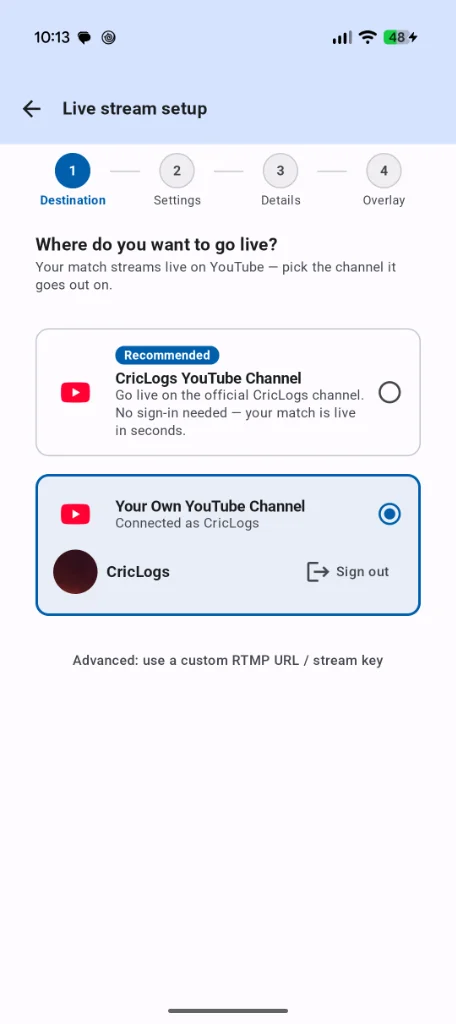
- No channel ready? Stream on the CricLogs YouTube channel instead, with no setup.
- Mark the stream "not made for kids" unless it is, or live chat is switched off.
Three ways to get a cricket match onto YouTube
| Route | Subscriber minimum | Score on screen | Setup |
|---|---|---|---|
| YouTube mobile app → Go Live | Yes. YouTube sets a minimum for mobile live streaming and has changed it over the years | No | Channel verified and enabled |
| Streaming app on your channel (CricLogs, or OBS with a stream key) | No | Yes, from the app's score strip or overlay | Channel verified and enabled |
| CricLogs YouTube channel | No | Yes | None. Pick it on the Go Live screen |
Eligibility checklist
| Requirement | How to check | If it fails |
|---|---|---|
| Channel verified with a phone number | YouTube Studio → Settings → Channel → Feature eligibility | Verify with SMS or a voice call |
| Live streaming enabled | YouTube Studio → Create → Go Live opens without an error | Wait up to 24 hours after first enabling |
| No live streaming restrictions in the past 90 days | Feature eligibility page | Wait out the restriction, or use the CricLogs channel |
| No active Community Guidelines strike | YouTube Studio → Dashboard | Wait for it to expire or appeal |
| Account owner is old enough | YouTube age requirements for your country | Stream from an adult organiser's account |
These are YouTube's rules, not CricLogs'. YouTube updates them from time to time; if something looks different, check YouTube Help before match day.
Enable live streaming on your channel
-
1
Open YouTube Studio and choose Create → Go Live
Sign in with the Google account that owns the channel. Choosing Go Live the first time starts the eligibility check, not a broadcast.
-
2
Verify the channel with a phone number
Enter the one-time code from SMS or a call. This is the step most cricket channels are missing.
-
3
Wait for live streaming to be enabled
First-time activation can take up to 24 hours. Do it at least a day before the match or tournament.
-
4
Connect the channel in CricLogs
On the match's Go Live screen, sign in with the same Google account and pick your channel as the destination.
-
5
Choose visibility and audience
Set Public or Unlisted and mark the stream as not made for kids unless it really is, so live chat keeps working.
YouTube settings that matter for cricket
| Setting | Recommended | Why |
|---|---|---|
| Visibility | Public for open matches; Unlisted for school, corporate and private games | Unlisted streams are watchable only by people with the link |
| Audience | No, it's not made for kids (unless it is) | Streams marked made for kids have live chat and some features turned off |
| Latency | Normal | Most stable picture; viewers are about 30–60 seconds behind live |
| Title | Teams, match number, tournament, ground | Helps people find the right stream and the replay later |
| Thumbnail | Team names and logos | Gets more taps when shared on WhatsApp |
Streams up to 12 hours long are saved on your channel automatically when they end, so players can watch the replay. For an all-day event, stream each match separately rather than one 10-hour stream.
Stream URL and stream key (RTMP)
CricLogs connects to your channel with Google sign-in, so you usually never see a stream key. You need one only when you send video to YouTube some other way: through OBS or Prism, or with the custom RTMP option in CricLogs.
- In YouTube Studio, choose Create → Go Live → Stream and copy the Stream URL and Stream key.
- Paste both into the RTMP settings of your app or OBS.
- Treat the stream key like a password. Anyone with it can stream to your channel. Reset it in YouTube Studio if it leaks.
- For OBS with a live score, add the CricLogs overlay as a browser source. See score overlay for OBS.
Common YouTube errors and fixes
| What you see | Likely reason | Fix |
|---|---|---|
| Live streaming is not available | Channel not verified, or not enabled yet | Verify, then wait up to 24 hours. Use the CricLogs channel today |
| Channel doesn't appear in the app | Signed in with a different Google account, or a Brand Account you didn't select | Sign in with the account that owns or manages the channel |
| Stream starts but no one can find it | Visibility is Unlisted or Private | Share the link directly, or set it to Public |
| Parts of the replay are muted | Content ID detected music near the camera | Keep music and ringing phones away from the camera |
| Live chat is missing | Stream marked made for kids | Change the audience setting for the next stream |
Frequently asked questions
Do I need 1,000 subscribers to live stream cricket on YouTube?
How long does it take to enable live streaming on YouTube?
Can I stream cricket without my own YouTube channel?
Should a school cricket stream be marked made for kids?
Will the match be saved on YouTube after the stream?
Where do I find my YouTube stream key?
Channel ready? Go live
Download CricLogs for Android, connect your channel, or use the CricLogs channel with no setup at all.
Download free on Google Play