The best camera angle for cricket live streaming
Viewers forgive a soft picture. They do not forgive a camera that cannot show where the ball went. One fixed position, directly behind the wicketkeeper in line with the pitch at about head height, gets almost every local match right. Here is how to set it up, and what to do on grounds where that spot is not available.
The short answer
- Directly behind the wicketkeeper, in line with the pitch, is the best single camera position for cricket.
- Height about 5–5.5 ft, so the lens sees over the keeper to the bowler's end.
- Use the 1× lens and move the tripod instead of zooming; digital zoom softens the picture.
- Never square of the wicket for the main camera: you lose the line of the ball and have to pan every delivery.
- Keep the sun behind the camera, and don't touch the camera mid-over.
Camera positions compared
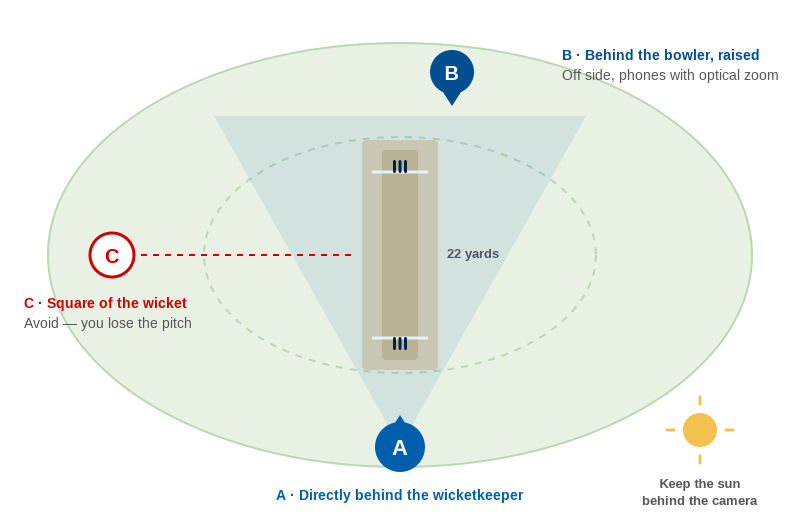
| Position | What viewers see | Use it for | Watch out for |
|---|---|---|---|
| A · Behind the keeper, in line | Bowler running in, ball pitching, the shot and where it goes | Main camera at almost every match | Keeper or a fielder blocking the view if too low |
| B · Behind the bowler, raised, slightly off side | Batter's face and shot, keeper behind | Phones with optical (not digital) zoom; second camera | Bowler's back blocks the view at the moment of delivery |
| Elevated, behind either end (stand, roof, cage top) | Classic TV look with field placings | Grounds with a pavilion or building in line | Needs a safe, steady mount |
| C · Square of the wicket | Side view of the batter only | Highlights and replays, never the main feed | Line and length are invisible; panning every ball |
Set up position A in five steps
-
1
Stand behind the keeper in line with the stumps
Walk back from the stumps along the line of the pitch until you are past the wicketkeeper and clear of any fielder standing behind.
-
2
Raise the phone to about 5–5.5 ft
Extend the tripod so the lens sees over the keeper's head to the bowler's end stumps.
-
3
Frame with the 1× lens
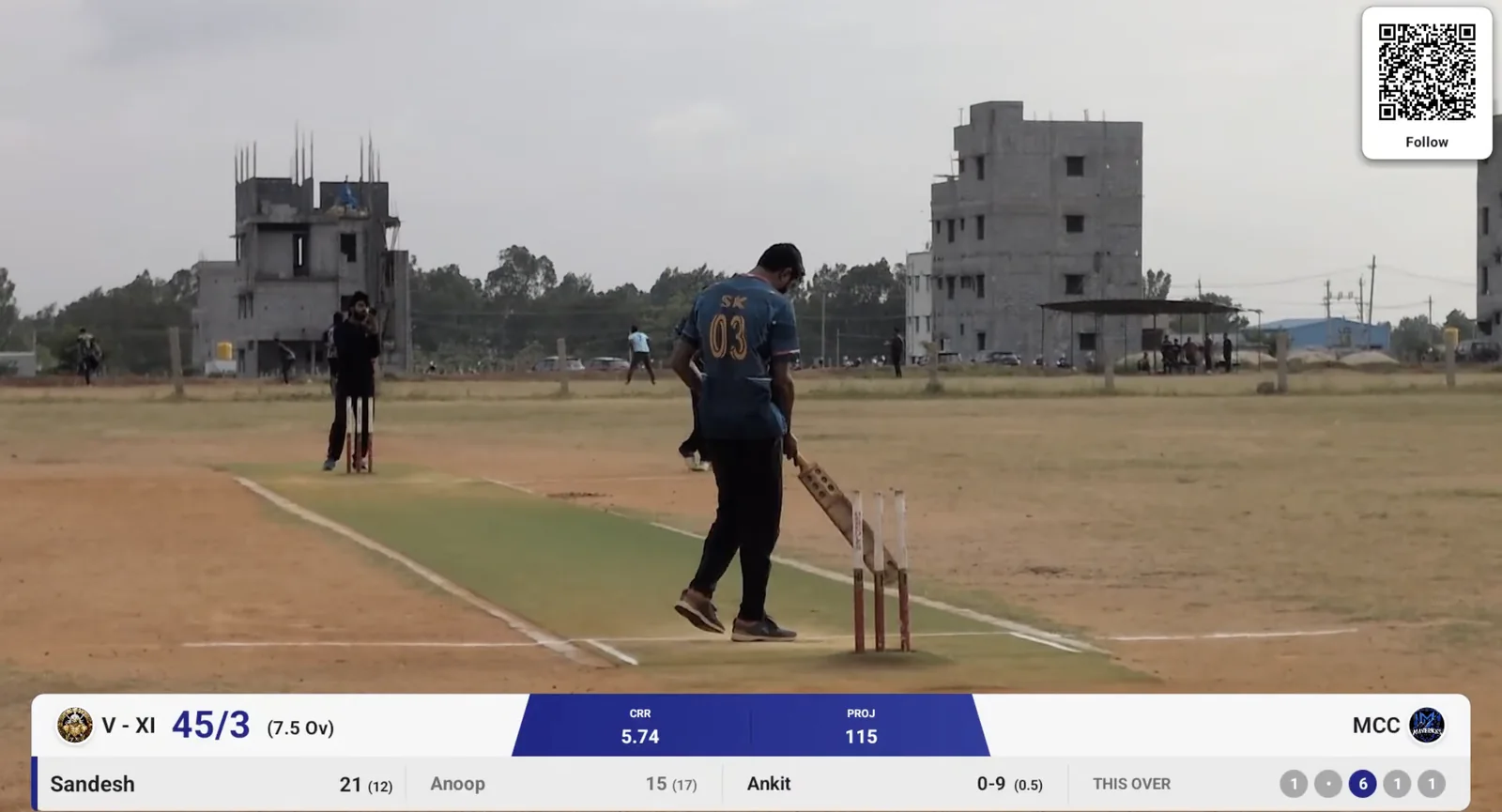
Keep the pitch vertical and centred, both sets of stumps visible and the horizon level. Move the tripod, not the zoom, until the pitch fills the middle of the frame.
-
4
Check the sun and the background
The sun should be behind or beside the camera, not in the frame. Avoid shooting straight into a bright sky or a white wall.
-
5
Lock it and leave it
Tighten the pan head and legs, hang a bag for weight, and do not touch the camera mid-over. Re-level only between overs.
Framing rules that make it watchable
- Pitch vertical and centred. If the pitch runs diagonally across the frame, the camera is off line; move the tripod sideways, don't rotate it.
- Both sets of stumps in frame, with some space above the far stumps to follow lofted shots.
- Level horizon. Use the phone's grid lines. A tilted frame is tiring to watch for three hours.
- Leave room for the score strip at the bottom. The keeper's back can sit behind it.
- 1× lens, no digital zoom. On a big ground, walk closer instead.
- Lock exposure to the pitch if your phone allows, so a bright sky doesn't darken the players.
Landscape suits open grounds and viewers on YouTube. Portrait suits narrow box cricket cages and viewers on phones. CricLogs can stream either.
The right angle for your kind of ground
| Ground | Best main position | Notes |
|---|---|---|
| Full-size club ground | Behind the keeper at the sight screen, 5–5.5 ft | If the sight screen blocks the view, go slightly higher or to one side of it |
| School or park ground with no space behind | Behind the bowler's end, raised, slightly off side | Use the 1× lens and accept a smaller picture rather than digital zoom |
| Box cricket or turf cage | High on the cage frame, behind either end | Lens against a gap in the net. See box cricket streaming |
| Indoor hall | High, behind one end, on a wall mount or tall tripod | Indoor lights: stream at 30 FPS |
| Tennis-ball street or gully match | Behind the keeper, as high as safely possible | Keep the phone out of the line of shots |
Adding a second camera
One phone streaming from the CricLogs app gives you one angle. For a second angle you switch between cameras on a laptop with OBS Studio or Prism Live Studio, and add the CricLogs score overlay as a browser source so the score stays on whichever camera is live.
- Main: behind the keeper (A).
- Second: behind the bowler raised (B) for the batter's face, or square of the wicket (C) for replays and close-ups.
- Third, for finals: a wide shot of the whole ground from the pavilion for field placings and celebrations.
Setup details are in score overlay for OBS and Prism.
Frequently asked questions
What is the best camera position for cricket live streaming?
How high should the camera be for cricket streaming?
Should I zoom the phone camera?
Why not film from square of the wicket?
Can I use two cameras with CricLogs?
Camera set? Go live
Download CricLogs for Android and stream from behind the keeper with a live score strip on every ball.
Download free on Google Play